
Relevant Products: pro print pro mfd
My Balance is the page where you check how much credit you have and how many credits each page type costs. It also lists your recent transactions.
You see My balance in the left navigation of the Cloud Portal Web UI only if the following conditions are fulfilled:
-
Balance is enabled for your account.
-
Your credit policy is not Free.
For administrators: Balance is set up on the Balance page.
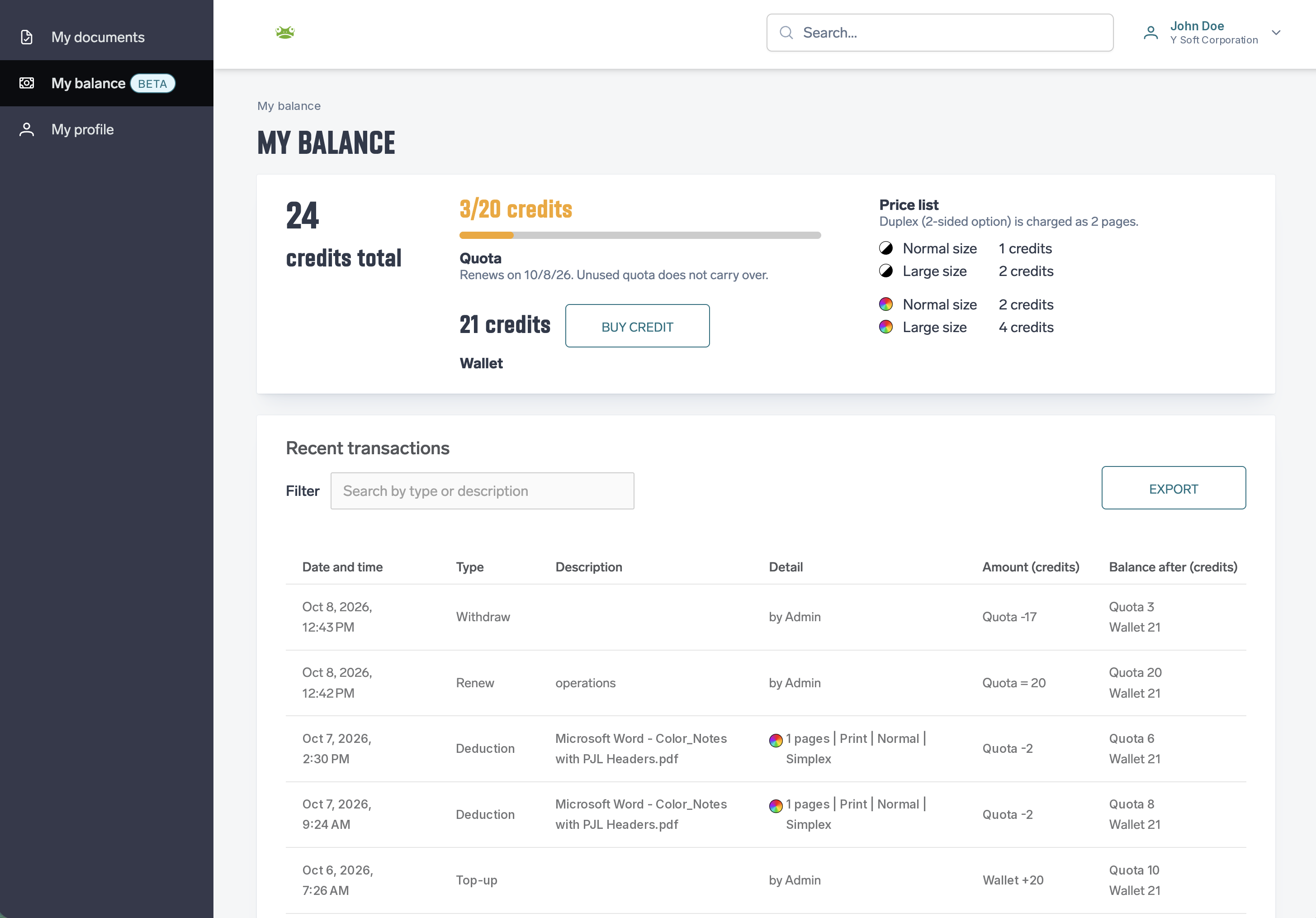
Credit and price list
The card at the top of the page shows only the balances included in your credit policy.
|
Item |
Shown when |
Description |
|---|---|---|
|
Credits total |
Your policy includes both quota and wallet |
Quota and wallet together. |
|
Quota |
Your policy includes quota |
Free credit granted by your administrator. If your quota renews on a schedule, the card shows the remaining and the full amount (for example 15/30 credits), a progress bar, the renewal date and the note "Unused quota does not carry over." The quota and its bar turn to a warning color when 20 % or less of the quota is left. |
|
Wallet |
Your policy includes a wallet |
Paid credit. If online payment is set up, you can buy more with Buy credit. Otherwise the card says "Contact your administrator to top up your wallet." |
|
Price list |
Always |
How many credits one page costs: black & white or color, normal or large size. Duplex (2-sided) is charged as 2 pages. |
Buying credit
-
Click Buy credit.
-
In the Top up wallet window, enter the number of credits in Credits to buy or pick a preset amount. The window shows what one credit costs and the total to pay.
-
If more than one payment method is offered, choose one in Pay with.
-
Click Continue to payment. You are redirected to the payment provider to complete the payment.
-
After you return, My balance shows the result. Your wallet is credited once the payment is confirmed, and the purchase appears in your transactions as Top-up.
Recent transactions
The table lists your transactions, newest first.
-
Filter narrows the list to transactions that match the text you enter, for example a transaction type such as Top-up.
-
Export downloads the rows shown on the current page of the table, with the filter applied, as a CSV file.
|
Column |
Description |
|---|---|
|
Date and time |
When the transaction was made (UTC). |
|
Type |
The kind of transaction, for example Top-up, Deduction or Renew. |
|
Description |
A description of the transaction, for example the name of a print or copy job, or the reason your administrator gave for a top-up. It can be empty. |
|
Detail |
For print and copy jobs: the number of pages with a black & white or color icon, Print or Copy, Normal or Large, and Simplex or Duplex. A job with both color and black & white pages shows both counts. For other transactions, who made them: by followed by the administrator's name, or System for automatic ones. |
|
Amount (credits) |
How much the transaction changed each balance, for example Quota -2 or Wallet +5. A transaction that sets the quota to a new value shows Quota = 20. |
|
Balance after (credits) |
The balances after the transaction. |