
Logging
YSoft SafeQ Job Service log file can be found at $JobServiceInstallationPath$/logs/jobservice.log, where the log file is rolled every day or when it reaches 50 MB in size.
Health check API
YSoft SafeQ Job Service has a REST API to check the health status of the service. It currently returns
-
version of the YSoft SafeQ Job Service
-
number of connected YSoft SafeQ Spoolers
-
availability of distributed layer
The information is available by calling HTTP GET method on /health endpoint
Calling the API
You can use tools such as Postman or Insomnia. Following is a sample of the request and response in Insomnia
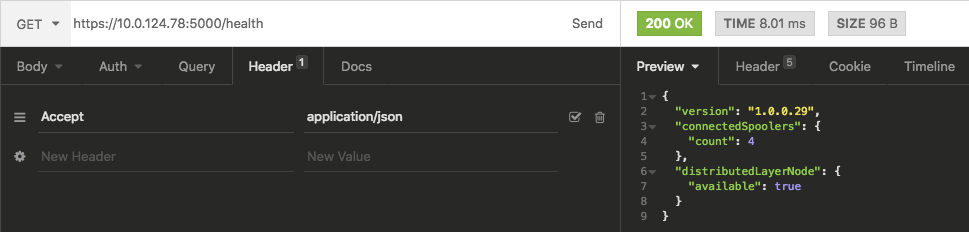
If you want to call the API from Terminal on macOS you can use following command
Bash
curl -H "Accept:application/json" https://{JobServiceIPAddress}:{JobServicePort}/health
If you want to cal the API from Windows Powershell you use following command
PowerShell
Invoke-WebRequest https://{JobServiceIPAddress}:{JobServicePort}/health @{"accept"="application/json"}