
Summary
This section describes how the shared entitlement works.
YSoft SafeQ Payment System (YPS) provides functionality called entitlement. Entitlement is a template to tell Payment System how to treat a certain user based on username or cost center which he belongs to.
General rules:
-
Each user belongs only to one cost center.
-
Each user can be mapped only to one entitlement.
-
Each cost center can be mapped only to one one entitlement.
-
Entitlement mapping through username has priority over mapping through cost center.
-
Administrator can enable shared entitlement mode when creating entitlement:
-
Shared entitlement Disabled means each user has his own quota or credit (budget). This is a default option.
-
Shared entitlement Enabled means cost center members share one quota or credit. Decrease of balance or remaining quota by one user will affect the whole cost center.
-
Only cost centers can be mapped to shared entitlement (usernames cannot).
-
-
When a user transitions from a non-shared entitlement to a shared entitlement, he will immediately begin utilizing the shared entitlement balance/quota. Subsequently, he will no longer appear under "Subjects" in the Payment System. Once the shared entitlement balance reaches zero, the user will be unable to perform any actions requiring a positive balance. This applies even to users who had a positive personal balance on their accounts prior to being moved to a shared entitlement. The user's personal balance is not lost; the system retains it in the database. If the user is reverted back to non-shared entitlement, he will resume utilizing his personal balance/quota.
Explanation
We strongly advise testing the intended scenario in a controlled environment before implementing it on a larger scale. This approach allows you to confirm that the outcome aligns with your expectations and requirements.
This is now functionality of shared entitlement may be tested and how the outcome should look like:
-
Management Interface
-
Create sample cost centers and users
-
Cost center name CC1, cost center number 1111, users assigned: cc1first, cc1u02
-
Cost center name CC2, cost center number 2222, users assigned: cc2u03, cc2u04
-
-
Billing > Price list > set up prices for print, copy, scan
-
Devices > Install an Embedded Terminal with Payment System feature enabled
-
-
YSoft Payment System Administration
-
Create entitlement with configuration:
-
Summary: sharedent
-
Shared entitlement: enabled
-
Cost center numbers: 1111, 2222
-
Type: Prepaid account
-
Initial balance: 10
-
Leave the rest on default
-
-
-
Functionality test
-
Authenticate on Embedded Terminal as cc1u01
-
Displayed user balance: 10
-
Make a scan (price is 0.4)
-
Log out
-
Authenticate on Embedded Terminal as cc1u01
-
Displayed user balance: 9.6
-
Log out
-
-
Functionality test
-
authenticate on MFD as cc1u02
-
user balance: 9.6
-
log out
-
-
Functionality test
-
authenticate on MFD as cc2u03
-
user balance: 10
-
log out
-
-
YSoft Payment System Administration
-
Go to Subjects > tab Personal
-
account cc1u01, cc1u02, cc2u03 and cc2u04 is not visible among subjects, because technically do not exist in Payment System, they are members of shared entitlement now
-
-
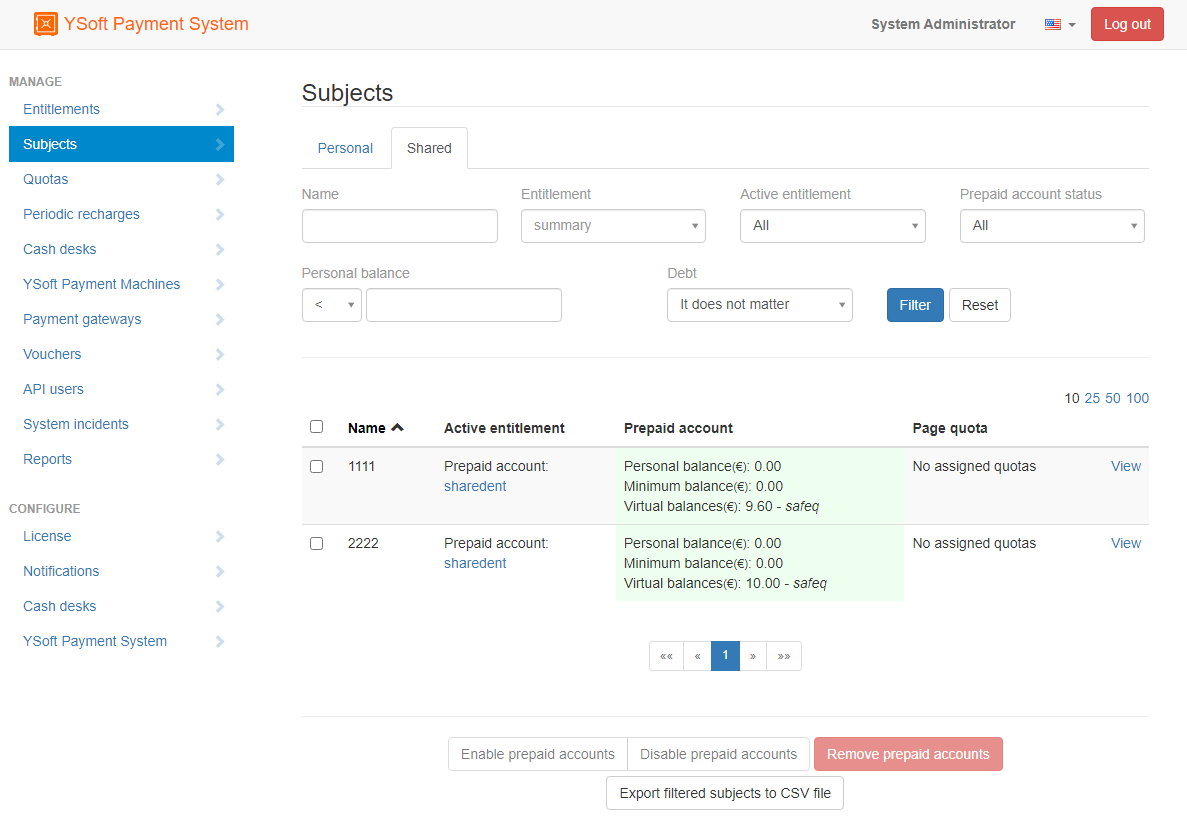
Go to Subjects > tab Shared
-
both cost centers listed and searchable by number (not by name)
-
CC1 balance is 9.6
-
CC2 balance is 10
-
-
-
Balance for shared entitlement can be increased e.g. by:
-
Periodical recharge
-
Cash desk (search for cost center number, not for name)
-
Details on both available in YSoft Payment System Administration web interface
"Initial balance" with shared entitlement is applied only once for each cost center. It triggers when the first user from this cost center authenticates on device.