
This external utility is used for device replication from files into the internal YSoft SafeQ Management Service database.
At a Glance
See YSoft Shell for information on how to run shell.
CLI Device Replicator
The command for replicator is "device replicate".
The device replicator has these parameters:
-
--username Name of the user connected to the rest service (administrator user name)
-
--password User password
-
--tenant Tenant domain identification (if not set, the default value is 'tenant_1')
-
--host URL of YSoft SafeQ Management Service (if not set, the default value is https://localhost The port number may be omitted as well, default is 80)
An example of command line arguments
device replicate --username username --password password --tenant tenant_1 --host https://localhost

With the parameters above, the .bat file for fast run can be created:
call "c:\SafeQ6\Management\utilities\Import tool\import_tool.bat" device replicate --username admin --password admin --tenant tenant_1 --host https://localhost
WARNING: Avoid using characters such as %, ^, or & in passwords when invoking import_tool.bat from an external script. These characters can cause command corruption, leading to an Unauthorized error. This is a known limitation - while such passwords may work correctly when entered directly in a shell, they can break when passed through batch scripts. The following special characters are known to work reliably in batch contexts: ! @ # $ * ( ) _ + = - \ { [ ] }
The password in the .bat file cannot be encrypted, improved security can be achieved by using combination of PowerShell and DPAPI to encrypt the password and execute the import:
<#
.DESCRIPTION
	Script executes CLI device replicator

	The script enhances security by storing password on HDD in encrypted way.
	The encryption is tied to Windows user, utilizing Windows Data Protection API - DPAPI.
	The account running the script must have WRITE permissions for the script file to be able to encrypt the password.

	Script should be executed on regular basis via Task Scheduler
		Action: powershell.exe
		Arguments: -ExecutionPolicy Bypass -File "<pathtofile>\import.ps1"
		Run whether user is logged on or not, with highest privileges if needed.

	You may need to unblock ps1 file before executing it:
		Run PowerShell as Administrator
		Run: Unblock-File -Path <pathtofile>\import.ps1
#>

#-----------------------------------------------------------[Parameters]-----------------------------------------------------------

$logDirectory = "$env:SAFEQ_HOME\..\Customization\import\log"
$importDir = "$env:SAFEQ_HOME\utilities\Import tool"
$username = 'admin'
$tenant = 'tenant_1'
$srvhost = 'https://localhost'

# $sqpassword initially set as plain text, upon first execution it will be auto-replaced with encrypted value
# $sqpassword plain text must be enclosed in single quotations '', not in ""
$password = 'mysecretpassword'

#-----------------------------------------------------------[Execution]------------------------------------------------------------

$today = Get-Date -Format "yyyy-MM-dd"
$logFile = Join-Path $logDirectory "import_$today.log"

# Ensure log folder exists
if (!(Test-Path $logDirectory)) {
	New-Item -ItemType Directory -Path $logDirectory | Out-Null
}

# --- Rotate old logs (keep 7 most recent) ---
$allLogs = Get-ChildItem -Path $logDirectory -Filter "import_*.log" | Sort-Object LastWriteTime -Descending
$logsToDelete = $allLogs | Select-Object -Skip 7
foreach ($log in $logsToDelete) {
Remove-Item $log.FullName -Force
}

Add-Content $logFile "`n$(Get-Date -Format "yyyy-MM-dd HH:mm:ss") SCRIPT START $($MyInvocation.MyCommand.Name)"

# VALIDATE PASSWORD CHARACTERS (other characters may not be passed properly via import_tool.bat)
$allowedPattern = '^[a-zA-Z0-9!@#$*()_+\=\-\\{}\[\]]*$'
if ($password -notmatch $allowedPattern) {
	# Find all invalid characters
	$invalidChars = ($password.ToCharArray() | Where-Object { $_ -notmatch '[a-zA-Z0-9!@#$*()_+\=\-\\{}\[\]]' }) -join ', '

	$errmsg = "Password contains invalid character(s): $invalidChars. Allowed: a-z, A-Z, 0-9, and !@#$*()_+=-\{[]}"
	Write-Error $errmsg
	Add-Content $logFile "$(Get-Date -Format "yyyy-MM-dd HH:mm:ss") $errmsg"
	Add-Content $logFile "$(Get-Date -Format "yyyy-MM-dd HH:mm:ss") SCRIPT TERMINATED"
	exit 1
}

# PASSWORD ENCRYPTION VIA DPAPI
$requiresEncryption = $false
$securePassword = $null
$decryptAttempted = $false

try {
	$securePassword = $password | ConvertTo-SecureString -ErrorAction Stop
} catch {
	$decryptAttempted = $true
	if ($password.Length -gt 50) {
		$errmsg = "Password decryption failed, and value appears encrypted (length > 50). It was likely encrypted using a different Windows account or on another machine. Cannot continue."
		Write-Error $errmsg
		Add-Content $logFile "$(Get-Date -Format "yyyy-MM-dd HH:mm:ss") $errmsg"
		Add-Content $logFile "$(Get-Date -Format "yyyy-MM-dd HH:mm:ss") SCRIPT TERMINATED"
		exit 1
} else {
	$requiresEncryption = $true
	}
}

if ($requiresEncryption) {
	Write-Host "Plaintext password detected. Encrypting..."
	Add-Content $logFile "$(Get-Date -Format "yyyy-MM-dd HH:mm:ss") Plaintext password detected. Encrypting..."

	# Encrypt the password
	$securePassword = ConvertTo-SecureString $password -AsPlainText -Force
	$encryptedString = $securePassword | ConvertFrom-SecureString
	$replacementLine = '$password = "' + $encryptedString + '"'

	# Replace this line in the script itself
	$scriptPath = $MyInvocation.MyCommand.Path
	try {
		(Get-Content $scriptPath) -replace '^\s*\$password\s*=.*', $replacementLine | Set-Content $scriptPath

		Write-Host "Password encrypted and script updated."
		Add-Content $logFile "$(Get-Date -Format "yyyy-MM-dd HH:mm:ss") Password encrypted and script updated."
	} catch {
		$errmsg = "Error while replacing password with encrypted value. Check that account running the script has WRITE permissions to the script file. Script will continue but password will remain unencrypted."
		Write-Host $errmsg
		Add-Content $logFile "$(Get-Date -Format "yyyy-MM-dd HH:mm:ss") $errmsg"
	}
}

# PASSWORD DECRYPTION FOR USE IN MEMORY
try {
	$plainPassword = [System.Runtime.InteropServices.Marshal]::PtrToStringAuto(
		[System.Runtime.InteropServices.Marshal]::SecureStringToBSTR($securePassword)
	)
} catch {
	Write-Error "Failed to decrypt the password. Exiting."
	Add-Content $logFile "$(Get-Date -Format "yyyy-MM-dd HH:mm:ss") Failed to decrypt the password. Exiting."
	Add-Content $logFile "$(Get-Date -Format "yyyy-MM-dd HH:mm:ss") SCRIPT TERMINATED"
	exit 1
}

# RUN THE IMPORT TOOL
$cmdhiddenpass = "$importDir\import_tool.bat device replicate --username $username --password <hidden> --tenant $tenant --host $srvhost"
Write-Host "Executing: $cmdhiddenpass"
Add-Content $logFile "$(Get-Date -Format "yyyy-MM-dd HH:mm:ss") Executing: $cmdhiddenpass"
$cmd = "`"$importDir\import_tool.bat`" device replicate --username $username --password $plainPassword --tenant $tenant --host $srvhost"

try {
	Add-Content "$env:SAFEQ_HOME\utilities\Import tool\ysoft-shell.log" "`n"
	Write-Host "For debug info see: $env:SAFEQ_HOME\utilities\Import tool\ysoft-shell.log"
	Add-Content $logFile "$(Get-Date -Format "yyyy-MM-dd HH:mm:ss") For debug info see: $env:SAFEQ_HOME\utilities\Import tool\ysoft-shell.log"
} catch {
	$errmsg = "Error while testing WRITE access to $env:SAFEQ_HOME\utilities\Import tool\ysoft-shell.log . Check that account running the script has WRITE permissions to it. Script will continue but debug information will not be available."
	Write-Host $errmsg
	Add-Content $logFile "$(Get-Date -Format "yyyy-MM-dd HH:mm:ss") $errmsg"
}

Start-Process "cmd.exe" -ArgumentList "/c $cmd" -WorkingDirectory $importDir -NoNewWindow -Wait
Add-Content $logFile "$(Get-Date -Format "yyyy-MM-dd HH:mm:ss") SCRIPT END"
The following steps are needed to enable CSV file replication:
-
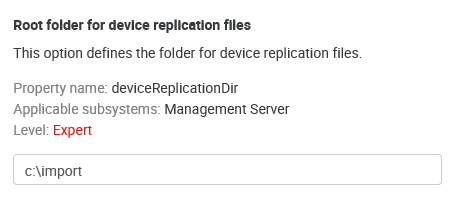
Configure the replication source directory by editing the deviceReplicationDir configuration property through System Settings. Usually, it is an absolute path on the local computer.
An example of a root folder for replication files
-
Configure the incrementalDeviceReplication property—if disabled (default), the replicator will delete all devices created by the previous replication. If enabled, the replicator will only update existing devices.
If incrementalDeviceReplication is disabled, the replicator will delete all devices created earlier. It will also permanently uninstall the embedded application from these devices, even if it was originally installed by another YSoft SafeQ instance or other means.
-
Configure sending emails when replication fails—see Replicator e-mail configuration page.
-
Create CSV files according to the structure described in the next chapter. Use UTF-8 for CSV file encoding.
-
Start the replicator by running the command line (for its parameters, see above).
-
For regular synchronization with the CSV file, schedule the import via system scheduled tasks.
-
Information about replication results will be saved into the log file (ysoft-shell.log) stored next to the import_tool.bat file.
Supported file formats: CSV (separated with ';'), Microsoft Excel (XLS and XLSX).
File Structure
-
Before replication, the respective files must be stored in the directory according to the configuration (see above).
-
These files must be stored in the format shown below. The files are processed in alphabetical order based on their names. (For replication, only some of them may be used.)
-
Optional values may be left blank. In this case, they will be obtained from the device template
-
All names are "case-sensitive", i.e., small and capital letters are distinguished. Example: group "default" is not the same as "Default".
Format of a row - single item entry
<device name>;<spooler controller group name>;<template unique ID>;<network address>;<device group name>;[direct queues];[reporting cost center number];[location or description];[Equipment ID];[Service Agreement ID];[Contact person];[ZIP code];[terminal network address];[terminal serial number]
Column specification
-
Device name – the name of a device. This parameter does not have to be unique in the device group. If device name is not specified, the device will not be replicated.
-
Spooler controller group name – name of a spooler controller group to which the device will be assigned. If no group exists or specified group does not exist then device will not be replicated.
-
Template unique ID – ID of device template from which the values not specified in the CSV file will be taken. All missing parameters (in the case of a new device) are taken over from it. If the template does not exist or is not specified, the device will not be replicated.
-
Device network address – the network address must be unique. If the device network address is not specified or is not unique, the device will not be replicated.
-
Device group name – the name of a device group to which the device will be assigned. If no group exists or the specified group does not exist, the device will not be replicated.
-
Direct queues – if the value is filled out, then direct queues will be assigned to the device. If updating the device, then all previously assigned direct queues will be removed and newly specified queues added. The individual names must be separated by commas (if multiple queues are to be assigned). The direct queue must be unique within all of YSoft SafeQ. If a device with the same direct queue exists, the new device will not be replicated.
-
Reporting cost center number– the cost center to which the device will be assigned if the value is specified. In the case of a new device, if the value is incorrect (the cost center has already been deleted or renamed) or the value is not specified, the value is taken from the template. If no such cost center number exists (the cost center in the template is also incorrect), the device will not be replicated.
-
Location or description description – a description of the device. If no value is specified, then the value from the template is taken (in the case of a new device).
-
Equipment ID – the equipment number of the device. If no value is specified, then the value stays empty.
-
Service Agreement ID – the maintenance contract number. If no value is specified, then the value stays empty.
-
Person to contact – the name, email, or phone number of the contact person. If no value is specified, then the value from the template is taken (in the case of a new device).
-
ZIP code – the zip code of the city where the device is. If no value is specified in the CSV file, then the value from the template is taken (in the case of a new device).
-
Terminal network address - the network address of the terminal. If the terminal network address is not specified, device network address is used. It's possible to alter value only for Terminal Professional version 4 terminal type.
-
Terminal serial number - the serial number of Terminal professional 3.5, Terminal ultralight or Cloud terminal. In the case of a Cloud terminal, the serial number must be unique and this value cannot be changed via replicator if the cloud terminal is already successfully installed.
There are two types of item in the row format prescription:
-
items in "< >" are required
-
items in "[ ]" are optional
Sample row:
Printer24;Spooler1;zQhcyz3dxa;10.0.10.12;MFDs;;0;Corridor B, near kitchen;;125498541000454;;;10.0.10.12;SQPR12345678900
If replicated devices use an embedded terminal, admin will have to install the embedded terminal manually after replication. The embedded settings are preconfigured, and admin just has to click the reinstall button in the device settings or the special page where all terminals can be reinstalled.