
From time to time it might be necessary to delete SPOC cache. The reasons may vary, for example the cache corruption caused by unexpected server shutdown.
The cache deletion consists of several manual steps that are documented. Example of related articles:
-
How to Delete the YSoft SafeQ Spooler Controller Cache - description of caching mechanism, impact of its deletion, instruction for cache deletion on a standalone SPOC
-
How to Restart a YSoft SafeQ Environment - description of restart procedures, instructions how to delete cache in a SPOC group
-
How and When to Restart a Standalone SPOC and SPOC Group - additional information describing scenarios when the cache deletion is inevitable
This KB article provides a PowerShell script that may be used for the cache deletion.
The typical use case:
-
Run the script as an Administrator on a standalone SPOC or on all SPOC group members at once.
-
Follow on-screen instructions, every important phase requires admin confirmation by pressing Enter.
-
Running the script via PowerShell ISE is advised (standard PowerShell may pause operations after highlighting some text by mouse).
-
For more details see DESCRIPTION section of the script.
This script is compatible with all builds of YSoft SafeQ 6.
It is provided "as is" without SLA guarantees for further modifications and enhancements.
Cache has to be always deleted on all SPOC group members at the same time. Deleting cache on one member of a SPOC group is not supported.
If one SPOC group member is faulty, keep it turned off until the downtime is possible, then then delete cache in the whole SPOC group.
Script output example:
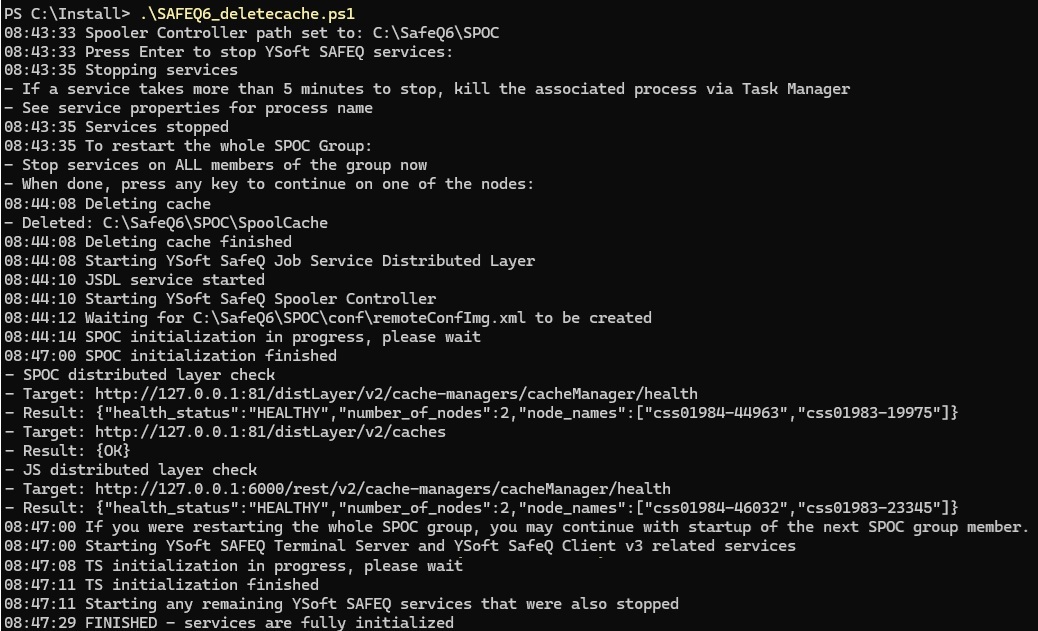
Script SPOCdeletecache.ps1
<#
.SYNOPSIS
   YSoft SAFEQ 6 SPOC group restart and cache deletion script

.DESCRIPTION
   Script helps to reinitialize the SPOC / SPOC group by SPOC cache deletion.
   - It automates the steps described in the documentation.
   - It can delete Job Service cache when configured so.
   - If you are asked by Y Soft to collect cache content before cleanup, please do so manually before running the script.

   Run the script as follows:
   - Make sure YSoft SafeQ Management Service is up and running on all management servers.
   - Run the script on all members of a single SPOC group simultaneously.
   - Follow the on-screen instructions to stop SAFEQ services.
   - Once the script displays "To restart whole SPOC Group, ..." on all the servers:
   -- Follow the on-screen instructions on one of the servers.
   -- The script will delete caches and start SAFEQ services.
   -- Once the first server finishes initialization, proceed to initialize the next server one by one.
   - After all servers are initialized, it is recommended to verify that all services are started.

   If the script fails on single node when restarting whole SPOC group, re-run the script on all nodes again.

   Script can be also used for a cache deletion on a standalone SPOC.

.EXAMPLE
   Run the PowerShell as Administrator, then launch the script in it.

.NOTES
  Version:        1.17
  Last Modified:  01/October/2025
#>

#-----------------------------------------------------------[Parameters]-----------------------------------------------------------

# Start TS service (and other services) automatically when SPOC finishes cache recovery ($true) or wait for command from administrator ($false)
$tsautostart = $true

# Delete also Job Service cache ($true) or leave it intact ($false).
# When $true:
# - Cached user sessions are removed, users must sign in to YSoft SafeQ Client v3 again.
#   This happens once and can be avoided by using SSO.
# - Jobs marked for deletion may remain in print job storage on servers or workstations;
#   remove old jobs manually if needed.
# - Build 85 and older: jobs spooled through Client v3 before cache deletion cannot be released.
#   They may still appear on the terminal, but release will fail.
#   Remove them in Management Interface and reprint.
$JScachecleanup = $false

#-----------------------------------------------------------[Execution]------------------------------------------------------------

#Admin rights check
If (-NOT ([Security.Principal.WindowsPrincipal][Security.Principal.WindowsIdentity]::GetCurrent()).IsInRole(([System.Security.Principal.SecurityIdentifier]'S-1-5-32-544'))) {
    Write-Warning 'Administrative rights are missing. Please re-run the script as an Administrator.'
    Read-Host 'Press any key to exit the script'
    exit
}

#Check path and set it manually if required
$pm_sqdir = Get-ChildItem -Path HKLM:\SYSTEM\CurrentControlSet\Services | ? {(($_ | Get-ItemProperty).PSChildName) -eq 'YSoftSQ-SPOC'}
if (!$pm_sqdir) {
    Read-Host 'Spooler Controller service not found. Terminating.'
    throw
}
$pm_sqdir = ($pm_sqdir | Get-ItemProperty).ImagePath.Split()[0].Trim('`"') -replace ('\\?bin\\wrapper.exe?','')
Write-Output ((Get-Date).ToString("HH:mm:ss") + " Spooler Controller path set to: $pm_sqdir")

if ($JScachecleanup -eq $true){
    $pm_JSdir = Get-ChildItem -Path HKLM:\SYSTEM\CurrentControlSet\Services | ? {(($_ | Get-ItemProperty).PSChildName) -eq 'YSoftSQ-JOB-SERVICE'}
    if (!$pm_JSdir) {
        Write-Output ((Get-Date).ToString("HH:mm:ss") + " Job Service not found, JS cache cleanup will not be made")
        $JScachecleanup = $false
    } else {
        $pm_JSdir = ($pm_JSdir | Get-ItemProperty).ImagePath.Split()[0].Trim('`"') -replace ('\\YSoft.JobService.Host.exe?','')
        Write-Output ((Get-Date).ToString("HH:mm:ss") + " Job Service path set to: $pm_JSdir")
    }
}

#Function to get list of the services to start/stop/restart during the cache recovery process
function listservice ($phase) {
    if ($phase -eq 'one')
    {
        Get-Service *YSoft* -Exclude YSoftPGSQL, YYSoftPGSQL, YSoftSQ-Management, YSoftSQ-LDAP, YSoftIms
    }
    elseif ($phase -eq 'two')
    {
        Get-Service *YSoft* -Exclude YSoftPGSQL, YYSoftPGSQL, YSoftSQ-Management, YSoftSQ-LDAP, YSoftIms, YSoft*TS*, YSoft*TerminalServer, YSoftSQ-SPOC, YSoftSQ-SPOCGS, YSoftSQ-JSDL, YSoftSQ-SPOOLER, YSoftSQ-JOB-SERVICE | Where-Object {$_.StartType -ne 'Manual' -and $_.StartType -ne 'Disabled'}
    }
    else
    {
        Throw '"listservice" was called without any parameter, the script likely contains an error. Try to download the script again.'
    }

}

# Function responsible for monitoring and looking up specific string in log file
function Wait-ForLogLine {
    param(
        [Parameter(Mandatory)][string]$Path,
        [Parameter(Mandatory)][string]$Text
    )

    # Wait for log file to appear initially
    while (-not (Test-Path -LiteralPath $Path)) { Start-Sleep -Milliseconds 200 }

    $fromBeginningNextOpen = $false  # first attach: tail from last line (end)

    while ($true) {
        # open file with sharing so writer can rotate/truncate
        $fs = [System.IO.FileStream]::new($Path, 'Open', 'Read', 'ReadWrite')
        $sr = [System.IO.StreamReader]::new($fs)

        if ($fromBeginningNextOpen) { $fs.Seek(0, 'Begin') | Out-Null }
        else                        { $fs.Seek(0, 'End')   | Out-Null }

        while ($true) {
            $line = $sr.ReadLine()
            if ($null -ne $line) {
                if ($line -match $Text) {
                    $sr.Close(); $fs.Close()
                    return $true
                }
            } else {
                Start-Sleep -Milliseconds 150

                # rotation gap: file temporarily missing → wait until recreated
                if (-not (Test-Path -LiteralPath $Path)) {
                    do { Start-Sleep -Milliseconds 150 } until (Test-Path -LiteralPath $Path)
                    $fromBeginningNextOpen = $true
                    break
                }

                # truncate-in-place: file length < current pos → reopen from beginning
                if ($fs.Length -lt $sr.BaseStream.Position) {
                    $fromBeginningNextOpen = $true
                    break
                }
            }
        }

        $sr.Close(); $fs.Close()
        # loop will reopen file; start from beginning if rotated/truncated
    }
}

#Stop YSoft SAFEQ services
Read-Host  ((Get-Date).ToString("HH:mm:ss") + " Press Enter to stop YSoft SAFEQ services")

$textgroup = ("{0} Stopping services`n" -f (Get-Date).ToString("HH:mm:ss")) +
          "- If a service takes more than 5 minutes to stop, kill the associated process via Task Manager`n" +
          "- See service properties for process name"
Write-Output $textgroup

listservice -phase 'one' | Stop-Service -Force -ErrorAction SilentlyContinue

$proc = Get-Process '*MigService*'
if ($proc.Count -ge 1)
{
    Write-Output ((Get-Date).ToString("HH:mm:ss") + " YSoftSQ-MIG service cannot be stopped, killing it by force")
    $proc | Select-Object Id, ProcessName, Path | Stop-Process -Force
    Start-Sleep -Seconds 4
}

# SBT-4955 workaround
$proc = Get-Process '*TerminalServer*'
if ($proc.Count -ge 1)
{
    Write-Output ((Get-Date).ToString("HH:mm:ss") + " YSoftSQ-TS service cannot be stopped, killing it by force")
    $proc | Select-Object Id, ProcessName, Path | Stop-Process -Force
    Start-Sleep -Seconds 4
}

if (((( listservice -phase 'one' | Where-Object {$_.Status -ne 'Stopped'}) | Measure-Object ).Count) -gt 0)
{
    Write-Output ((Get-Date).ToString("HH:mm:ss") + " Following services are still running: " + $((listservice -phase 'one' | Where-Object {$_.Status -ne 'Stopped'}).DisplayName -join ', '))
    Throw "Failed to stop services listed above, stop them manually or kill the process associated with them via Task Manager (see service properties for process name). Then start the script on this server again."
}

Write-Output ((Get-Date).ToString("HH:mm:ss") + " Services stopped")

$textgroup = ("{0} To restart the whole SPOC Group:`n" -f (Get-Date).ToString("HH:mm:ss")) +
          "- Stop services on ALL members of the group now`n" +
          "- When done, press any key to continue on one of the nodes"
Read-Host $textgroup

#Delete caches

if ($JScachecleanup -eq $true){
    $pm_foldertoremove = "$pm_sqdir\SpoolCache","$pm_JSdir\distServer\data\jobService\index"
}
else{
    $pm_foldertoremove = "$pm_sqdir\SpoolCache"
}

Write-Output ((Get-Date).ToString("HH:mm:ss") + " Deleting cache")
foreach ($pm_folder in $pm_foldertoremove) {
    Remove-Item -Path $pm_folder -Recurse -ErrorAction SilentlyContinue
    if (-not (Test-Path $pm_folder)) {"- Deleted: $pm_folder"}
}

if (Test-Path -Path $pm_sqdir\SpoolCache)
{
    Throw ((Get-Date).ToString("HH:mm:ss") + " Terminating as deleting SPOC cache has failed. Make sure all the services are stopped, then use the script again.")
}
elseif ($JScachecleanup -eq $true -and (Test-Path -Path $pm_JSdir\distServer\data\jobService\index))
{
    Throw ((Get-Date).ToString("HH:mm:ss") + " Terminating as deleting JS cache has failed. Make sure all the services are stopped, then use the script again.")
}
else
{
    Write-Output ((Get-Date).ToString("HH:mm:ss") + " Deleting cache finished")
}

#Start YSoftSQ-JSDL service if exists
if (Get-Service *YSoftSQ-JSDL*)
{
    try
    {
        Write-Output ((Get-Date).ToString("HH:mm:ss") + " Starting YSoft SafeQ Job Service Distributed Layer")
        # Restart-Service is better than Start-Service, especially in situation when script was launched shortly after OS reboot and services are set for delayed start
        Get-Service *YSoftSQ-JSDL* | Restart-Service -ErrorAction Stop
    }
    catch
    {
        Write-Output ((Get-Date).ToString("HH:mm:ss") + " Starting YSoft SafeQ Job Service Distributed Layer service has failed. Please try it again manually once the rest of steps is finished.")
    }
    finally
    {
        Write-Output ((Get-Date).ToString("HH:mm:ss") + " JSDL service started")
    }

}

#Start SPOC service and wait for initialization
Write-Output ((Get-Date).ToString("HH:mm:ss") + " Starting YSoft SafeQ Spooler Controller")

if ((Get-Service YSoftSQ-SPOC).Status -eq 'Stopped')
{
    try
    {
        Start-Service YSoftSQ-SPOC -ErrorAction Stop
    }
    catch
    {
        Throw "Starting YSoftSQ-SPOC service has failed, terminating"
    }
    finally {}
}
else
{
    Throw "YSoftSQ-SPOC is already running, this is unexpected. Start the script again."
}

try
{
    Write-Output ((Get-Date).ToString("HH:mm:ss") + " Waiting for $pm_sqdir\conf\remoteConfImg.xml to be created")
    do {Start-Sleep 2 } until (Test-Path $pm_sqdir\conf\remoteConfImg.xml)
    [xml]$remoteConf= get-content $pm_sqdir\conf\remoteConfImg.xml
    $pm_orsFailoverLockManager = $remoteConf.configuration.property | Where-Object {$_.key -eq 'orsFailoverLockManager'}

    if ($pm_orsFailoverLockManager.Value -eq 'true')
    {
        $pm_lookupstring = 'Download\sentities\sfinished\sfrom\sother\sORSes\sin\sNRG'
    }

    elseif ($pm_orsFailoverLockManager.Value -eq 'false')
    {
        # this is default in SQ6
        $pm_lookupstring = 'End\sof\sprocessing\sof\sGetNewJobsByUsersResponseMessage'
    }
}
catch
{
    Throw "Error occurred while trying to verify configuration in remoteConfImg.xml, terminating"
}
finally
{
    if (-Not($pm_lookupstring))
    {
        Throw "Property orsFailoverLockManager not found in remoteConfImg.xml, terminating"
    }
    Write-Output ((Get-Date).ToString("HH:mm:ss") + " SPOC initialization in progress, please wait")
}

$monitoredLog = "$pm_sqdir\logs\spoc.log"
Wait-ForLogLine $monitoredLog $pm_lookupstring | Out-Null
Write-Output ((Get-Date).ToString("HH:mm:ss") + " SPOC initialization finished")

#Dist layers check
if ((Get-Service YSoftSQ-SPOCGS).Status -eq 'Running') {
    "- SPOC distributed layer check"
    "- Target: http://127.0.0.1:81/distLayer/v2/cache-managers/cacheManager/health"
    try { $(Invoke-WebRequest http://127.0.0.1:81/distLayer/v2/cache-managers/cacheManager/health -TimeoutSec 5).content -replace '.*("health_status":".*?","number_of_nodes":\d+,"node_names":\[.*?\]).*', '- Result: {$1}'} catch {$result = '- Result: warning, no response';$result}
    "- Target: http://127.0.0.1:81/distLayer/v2/caches"
    try { "- Result: {$((Invoke-WebRequest http://127.0.0.1:81/distLayer/v2/caches -TimeoutSec 5).StatusDescription)}" } catch {$result = '- Result: warning, no response';$result}
} else {
    "- SPOC distributed layer check"
    "- Result: skipped, YSoftSQ-SPOCGS service not running (likely not in SPOC group)"
}
if (Get-Service *YSoftSQ-JSDL*){
    "- JS distributed layer check"
    "- Target: http://127.0.0.1:6000/rest/v2/cache-managers/cacheManager/health"
    try { $(Invoke-WebRequest http://127.0.0.1:6000/rest/v2/cache-managers/cacheManager/health -TimeoutSec 5).content -replace '.*("health_status":".*?","number_of_nodes":\d+,"node_names":\[.*?\]).*', '- Result: {$1}'} catch {$result = '- Result: warning, no response';$result}
}

Write-Output ((Get-Date).ToString("HH:mm:ss") + " If you were restarting the whole SPOC group, you may continue with startup of the next SPOC group member.")

#Start TS service and wait for initialization
if ($tsautostart -eq $false)
{
    Read-Host ((Get-Date).ToString("HH:mm:ss") + " Press Enter to start YSoft SAFEQ Terminal Server and other remaining services")
}

try
{
    if (Get-Service *YSoftSQ-SPOOLER*) {
        Write-Output ((Get-Date).ToString("HH:mm:ss") + " Starting YSoft SAFEQ Terminal Server and YSoft SafeQ Client v3 related services")
    } else {
        Write-Output ((Get-Date).ToString("HH:mm:ss") + " Starting YSoft SAFEQ Terminal Server service")
    }

    # SBT-4955 workaround, keeping it in place forever for backward compatibility with older builds
    $proc = Get-Process '*TerminalServer*'
    if ($proc.Count -ge 1)
    {
        Write-Output ((Get-Date).ToString("HH:mm:ss") + " YSoft SAFEQ Terminal Server service is already running, that is unexpected. Terminating the process to allow a clean startup.")
        $proc | Select-Object Id, ProcessName, Path | Stop-Process -Force
        Start-Sleep -Seconds 4

    }


    # Restart-Service is better than Start-Service, especially in situation when script was launched shortly after OS reboot and services are set for delayed start, JS must start before SPOOLER in SQ6 Build 79 and below (SBT-4477)
    Get-Service YSoft*TS*, YSoft*TerminalServer | Restart-Service -ErrorAction Stop
    Get-Service *YSoftSQ-JOB-SERVICE*, *YSoftSQ-SPOOLER* | Restart-Service -ErrorAction Stop
}
catch
{
    if (Get-Service *YSoftSQ-SPOOLER*) {
        Throw ((Get-Date).ToString("HH:mm:ss") + " Starting YSoft SAFEQ Terminal Server, YSoft SafeQ Spooler or YSoft SafeQ Job Service has failed, terminating. Please try to start it manually and then start all the remaining services.")
    } else {
        Throw ((Get-Date).ToString("HH:mm:ss") + " Starting YSoft SAFEQ Terminal Server service has failed, terminating. Please try to start it manually and then start all the remaining services.")
    }
}
finally
{
    Write-Output ((Get-Date).ToString("HH:mm:ss") + " TS initialization in progress, please wait")
}

$pm_lookupstring = 'TS\sfully\sstarted'
$monitoredLog = "$pm_sqdir\terminalserver\logs\terminalserver.log"
Wait-ForLogLine $monitoredLog $pm_lookupstring | Out-Null

Write-Output ((Get-Date).ToString("HH:mm:ss") + " TS initialization finished")

#Start remaining services and wait for initialization
Write-Output ((Get-Date).ToString("HH:mm:ss") + " Starting any remaining YSoft SAFEQ services that were also stopped")
try
{
    # Restart-Service is better than Start-Service, especially in situation when script was launched shortly after OS reboot and services are set for delayed start
    listservice -phase 'two' | Restart-Service -ErrorAction Stop
}
catch
{
    Write-Output ((Get-Date).ToString("HH:mm:ss") + " Startup of some additional YSoft SAFEQ services has failed. Make sure to start all remaining YSoft SAFEQ services manually.")
}
finally
{
    Write-Output ((Get-Date).ToString("HH:mm:ss") + " FINISHED - services are fully initialized" )
}