
The page provides steps to review the health of print job delivery and print job accounting based on the job history from the database records.
Prerequisites:
-
Read access to YSoft SafeQ database and ability to export the output to a CSV file.
-
Basic knowledge of PowerShell and SQL.
-
Knowledge on how to generate contingency tables in MS Excel.
Recommendations:
-
Use PowerShell 7 to run the PowerShell script. Its performance optimizations allow processing of 60MB large CSV input file in ~20 minutes while PowerShell 3 and PowerShell 5 takes ~1 hour to process (especially the initial grouping part is time consuming). The 500MB large CSV input file is processed in 2 hours on a PC with 11GB free RAM.
-
If the memory utilization stays above 95% for more than 5 minutes while analysis are in progress, try to use smaller input CSV files. This will improve speed of processing. To get a smaller CSV file extend the where condition in the SQL query by date and limit the output to several last days.
-
By clicking with the mouse in the PowerShell script the processing may get paused (progress bar will stop moving), pressing Enter will resume processing.
Limitations:
-
The time range covered by the report is limited to 1 month prior the day of generating it (source DB table typically does not contain the older data).
-
delivered_accounted_later (true/false) is evaluated only for the first print attempt that failed. Subsequent delivery attempts of the same job to MFD have value set to irrelevant .
-
Job that was released properly but was later set to CANCELED by administrator via YSoft SafeQ Management Interface is considered as _accountedWithError .
-
Job queued multiple times in a short succession (before accounting message was processed, especially with MFDs using pull accounting) may be evaluated as _notAccounted .
-
Job accounted using batch accounting (with HW terminal) does not have correct value of accounted pages .
-
Having different time on the MFD with the MFD specific accounting compared to the server time will cause discrepancies (jobs printed once will have negative or extremely large TimeSpanSeconds ; jobs printed multiple times in a SPOC group may also have incorrect Result ; limitation_01 in ps1 file) .
-
DEVname, DEVaddr , DEVacc , DEVstatus , DEVterm, DEVbackend, DEVspoc , DEVspocgroup is based on the printer configuration at the time the SQL query was launched. If any of those values changed in the past, it will not be recognizible from the output.
-
for example you may filter out the records that happened before the backend has changed in case you know the date when the change took the place.
-
-
Difference between count of pages from parser ( pagesParser ) and count of pages from accounting ( pagesAccounting ) can occur when:
-
parser did not provide accurate information (e.g. disabled or with special jobs that failed to be parsed properly)
-
user selected multiple copies of job to be released on the terminal
-
Resolution
Step 1 - obtain CSV with the history of print jobs
-
Configure your database connectivity tool for the export with column headers
-
MS SQL
-
Run MS SQL Management Studio > In the upper menu go to Query > Query Options > Results > Grid > check "Include column headers when copying or saving the results" > confirm the setting
-
Some versions of MS SQL Management studio need to be restarted to apply the change.
-
-
PgAdmin 3
-
No special setting required
-
-
-
Run this query on SQDB6 database
select sjl.id, sjl.job_id, coalesce (sj.job_guid,'') job_guid, coalesce (u.login,'') login, sjl.queue_id, sjl.device_id, sjl.date, sjl.status, sjl.message_id, coalesce (sjl.note,'') note, coalesce (sd.status,'') DEVstatus, coalesce (sd.name,'') DEVname, coalesce (sd.network_address,'') DEVaddr, coalesce (sd.accounting_type,'') DEVacc, coalesce (ter.vendor,'') DEVterm, coalesce (sd.backend,'') DEVbackend, coalesce (sc.name,'') DEVspoc, case when scg.multicast_address is null then '' else scg.name end DEVspocgroup, coalesce (sj.filesize,0) JOBsize, coalesce (sj.total_pages,0) JOBpages from tenant_1.smartq_jobs_log sjl left join (select id, status, name, network_address, accounting_type, backend, spooler_controller_id, spooler_controller_group_id from tenant_1.devices) sd on sd.id = sjl.device_id and sjl.status = 8 left join (select id, job_guid, filesize, total_pages, user_id from tenant_1.smartq_jobs) sj on sj.id = sjl.job_id and sjl.status = 8 left join tenant_1.users u on u.id = sj.user_id left join tenant_1.spooler_controllers sc on sc.id = sd.spooler_controller_id left join tenant_1.spooler_controller_groups scg on scg.id = sd.spooler_controller_group_id left join (select device_id, vendor from tenant_1.terminals) ter on ter.device_id = sjl.device_id and sjl.status = 8 where sjl.job_id in (select distinct job_id from tenant_1.smartq_jobs_log where status = 8) order by sjl.job_id asc, sjl.id asc -
Save the output to the coma delimited CSV file
-
MS SQL Management Studio
-
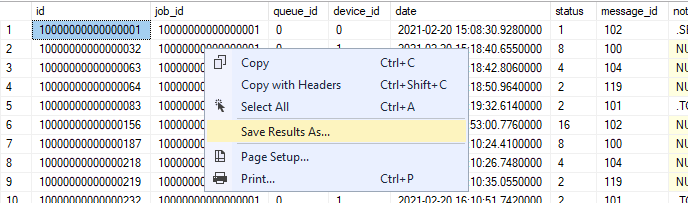
right-click anywhere in the result and choose "Save result as" > "Save as type" set to CSV
-
-
PgAdmin 3
-
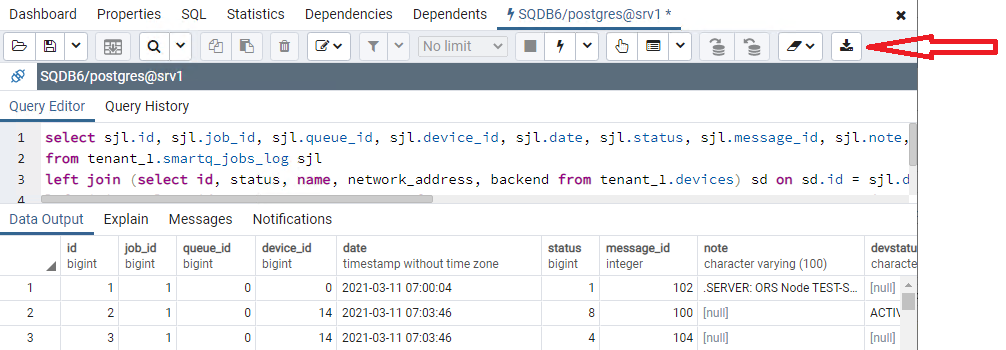
click "Download as CSV" icon
-
-
-
Verify the file content (e.g. in Notepad++), the first line in the file must contain the headers. Example:
-
id,job_id,job_guid,login,queue_id,device_id,date,status,message_id,note,DEVstatus,DEVname,DEVaddr,DEVacc,DEVterm,DEVbackend,DEVspoc,DEVspocgroup,JOBsize,JOBpages
-
Step 2 - parse the CSV using custom PowerShell script
-
Edit the PowerShell script and set path to CSV file in variable $csvin
<# .SYNOPSIS The script analyzes the print job history from the source data and generates the CSV file with printing/accounting history. .DESCRIPTION For details refer to the description of the Knowledge Base article this script is attached to. .PARAMETER csvin Path to the CSV file to be parsed. .NOTES Version: 1.15 Last update: Feb/02/2024 #> #-----------------------------------------------------------[Parameters]----------------------------------------------------------- # Path to the source CSV # Example: $csvin = 'C:\temp\input.csv' $csvin = 'c:\temp\data-1631780098653.csv' # Delimiter in the source CSV, the same delimiter will be used for output CSV # Example: $delim = ',' $delim = ',' #-----------------------------------------------------------[Execution]------------------------------------------------------------ # Create function to get date function date () { (Get-Date).ToString("HH:mm:ss") } # Create function to write result to the file function writeresult ($datatowrite, $command) { if ($command -eq 'tmp') { $datatowrite | Select TimePending, TimeDeliveryEnd, TimeSpanSec, login, job_id, job_guid, pend_id, sizeByte, DeliveryAttempt, QueueType, DEVname, DEVaddr, DEVstatus, DEVacc, DEVterm, DEVbackend, DEVspoc, DEVspocgroup, pagesParser, pagesAccounting, pagesParserGTAccounting, Result, delivered_accounted_later | Export-Csv -Path $csvtmp -Encoding utf8 -Delimiter $delim -NoTypeInformation -Append } elseif ($command -eq 'fin') { $datatowrite | Select TimePending, TimeDeliveryEnd, TimeSpanSec, login, job_id, job_guid, pend_id, sizeByte, DeliveryAttempt, QueueType, DEVname, DEVaddr, DEVstatus, DEVacc, DEVterm, DEVbackend, DEVspoc, DEVspocgroup, DEVlast15, pagesParser, pagesAccounting, pagesParserGTAccounting, Result, delivered_accounted_later | Export-Csv -Path $csvout -Delimiter $delim -Encoding utf8 -NoTypeInformation Remove-Item $csvtmp } } # Create function to determine if the print job was printed or not and what was the result function analyzedelivery ($in) { $st8f = $in | ? {$_.status -eq '8'} # pending $accounting = $in | ? {$_.message_id -eq '101' -or $_.message_id -eq '111' } # accounted $jobresult = New-Object -TypeName PSobject -Property @{ job_id = $st8f.job_id job_guid = $st8f.job_guid pend_id = $st8f.id sizeByte = $st8f.JOBsize pagesParser = [math]::Round($st8f.JOBpages) pagesAccounting = if (!$accounting) {''} else { [math]::Round(($accounting.note -split ':|\s')[1])} DeliveryAttempt = $st8f.DeliveryAttempt QueueType = if ($st8f.queue_id -eq 0) {'secure'} else {'direct'} TimePending = $st8f.date DEVname = $st8f.DEVname DEVaddr = $st8f.DEVaddr DEVacc = $st8f.DEVacc DEVterm = $st8f.DEVterm DEVbackend = $st8f.DEVbackend DEVspoc = $st8f.DEVspoc DEVspocgroup = $st8f.DEVspocgroup DEVstatus = $st8f.DEVstatus login = $st8f.login } # Calculation of time it took to deliver job / to fail on delivery. # Sometimes it happens that no end of delivery is present (even for valid jobs that are long time in the past) # Sometimes it happens the accounting / deletion is in the past compared to pending job, thus at first we try to pick newer events and only if there are none, we try to pick previous events - limitation, using wrong time on MFD will lead to incorrect timespan evaluation. $deliveryoutcome = $in | ? {$_.$sortmethod -ge $st8f.$sortmethod} | ? {$_.status -contains '32' -or $_.status -contains '64' -or $_.status -contains '512' -or $_.status -contains '1024' -or $_.status -contains '32768' -or $_.message_id -contains '119'} if (!($deliveryoutcome)) { $deliveryoutcome = $in | ? {$_.status -contains '32' -or $_.status -contains '64' -or $_.status -contains '512' -or $_.status -contains '1024' -or $_.status -contains '32768' -or $_.message_id -contains '119'} } if ($deliveryoutcome) { $deliveryoutcome = $deliveryoutcome[0].date $jobresult | Add-Member -type NoteProperty -name TimeDeliveryEnd -value $deliveryoutcome $TimeSpanSec = [math]::Round((New-TimeSpan -Start $($jobresult.TimePending) -End $($jobresult.TimeDeliveryEnd)).TotalSeconds) $jobresult | Add-Member -type NoteProperty -name TimeSpanSec -value $TimeSpanSec } else { $jobresult | Add-Member -type NoteProperty -name TimeDeliveryEnd -value 'N/A' $jobresult | Add-Member -type NoteProperty -name TimeSpanSec -value '0' } # Check if more pages were parsed than accounted (if parser is lower, it is ok since user might have selected multiple copies on terminal) if ($jobresult.pagesParser -gt $jobresult.pagesAccounting) { $jobresult | Add-Member -type NoteProperty -name pagesParserGTAccounting -value 'true'} else { $jobresult | Add-Member -type NoteProperty -name pagesParserGTAccounting -value 'false'} # Detecting job delivery and accounting health $msgid = $in.message_id $stat = $in.status if ( $msgid.Contains('101') -or $msgid.Contains('111') ) { <# accounted #> if ( !$stat.Contains('32') -and !$stat.Contains('64') ){ $jobresult | Add-Member -type NoteProperty -name Result -value 'delivered_accounted' } elseif ( $stat.Contains('32') -and !$stat.Contains('64') ){ <# job accounted only partially is set to CANCELED during accounting data processing #> $jobresult | Add-Member -type NoteProperty -name Result -value 'delivered_accountedWithError' } elseif ( $stat.Contains('32') -and $stat.Contains('64') ){ <# job had err on delivery and accounted only partially is set to CANCELED during accounting data processing #> $jobresult | Add-Member -type NoteProperty -name Result -value 'ERR_in_delivery_accountedWithError' } elseif ( $stat.Contains('64') ){ # error occurred on delivery, job partially or fully delivered, accounting information came $jobresult | Add-Member -type NoteProperty -name Result -value 'ERR_in_delivery_accounted' } } elseif ($stat.Contains('2')) { <# delivered #> $jobresult | Add-Member -type NoteProperty -name Result -value 'delivered_notAccounted' } else { if ( $stat.Contains('64') -and $stat.Contains('4')){ # job delivery started, some bytes were sent but then there was an error $jobresult | Add-Member -type NoteProperty -name Result -value 'ERR_in_delivery_notAccounted' } elseif ( $stat.Contains('64') ){ # connection could not be established (e.g. Printer not repsponding, IPP st. stopped...) or delivery not even attempted as preceding job from the same batch failed) $jobresult | Add-Member -type NoteProperty -name Result -value 'ERR_on_status_check_or_consequence' } elseif ( $stat.Contains('1024') ){ $jobresult | Add-Member -type NoteProperty -name Result -value 'queued > canceled_on_server_reboot' } elseif ( $stat.Contains('32') ){ $jobresult | Add-Member -type NoteProperty -name Result -value 'queued > canceled' } elseif ( $stat.Contains('512')){ $jobresult | Add-Member -type NoteProperty -name Result -value 'queued > rejected' } elseif ( $stat.Contains('32768')){ $jobresult | Add-Member -type NoteProperty -name Result -value 'queued > deleted' } if (!$jobresult.Result) { $jobresult | Add-Member -type NoteProperty -name Result -value 'in_progress' } } $jobresult } # Check presence of input file If (!(Test-Path $csvin)) {Throw "Input file does not exist. \n Terminating. Path: $csvin.FullName"} $csvin = Get-ChildItem $csvin # Check presence of output files (conflict prevention) $csvinName = $csvin.Name $csvdir = $csvin.DirectoryName $csvoutName = $csvin.BaseName + '_analyzed.csv' $csvout = $csvin.DirectoryName + '\' + $csvoutName $csvtmpName = $csvin.BaseName + '_analyzed.tmp' $csvtmp = $csvin.DirectoryName + '\' + $csvtmpName Write-Output $((date) + " Input file: $csvinName") Write-Output $((date) + " Temporary file: $csvtmpName") If (Test-Path $csvtmp) { Write-Output $((date) + " Destination temporary file already exists.`n Terminate the script to prevent overriding.`n Press Enter to override the file.") Read-Host Try { Remove-Item $csvtmp -ErrorAction Stop } Catch { Throw "Destination file failed to be deleted. It is likely in use by another program. Delete the file and then run the script again. Terminating script." } } Write-Output $((date) + " Destination file: $csvoutName") If (Test-Path $csvout) { Write-Output $((date) + " Destination file already exists.`n Terminate the script to prevent overriding.`n Press Enter to override the file.") Read-Host Try { Remove-Item $csvout -ErrorAction Stop } Catch { Throw "Destination file failed to be deleted. It is likely in use by another program. Delete the file and then run the script again. Terminating script." } } Write-Output $((date) + " Working directory: $csvdir") Write-Output $((date) + ' CSV import in progress') $csv1 = Get-Content $csvin if ($csv1[0] -notmatch 'job_id') { Throw "CSV import failed. The first line does not contain headings. Fix the import file and run the script again." } $csv1 = $csv1 -replace 'NULL' $csv1 = $csv1 | ConvertFrom-Csv -Delimiter $delim Write-Output $((date) + ' Grouping imported records per job_id') $jobgrp = $csv1 | Group-Object -Property job_id Remove-Variable csv1 # memory cleanup Write-Output $((date) + ' jobs total: ' + $jobgrp.Name.Count) Write-Output $((date) + ' Filtering out jobs never queued for print') $jobgrp = $jobgrp | Where-Object { ($_.Group.Status -contains 8) } Write-Output $((date) + ' jobs queued: ' + $jobgrp.Name.Count) Write-Output $((date) + ' Analyzing history of queued jobs') $resultarray = @() $progresstrack = 0 # In case there is only a single job convert job group to an array to prevent handling exceptions if ($jobgrp -isnot [array]) { $jobgrp_tmp = @() $jobgrp_tmp += $jobgrp $jobgrp = $jobgrp_tmp Remove-Variable jobgrp_tmp } # Convert Array to ArrayList to allow object removal and better performance $jobgrp = [System.Collections.ArrayList]$jobgrp $jobgrpsize = $jobgrp.count # Analyze every single job do { $onejob = $jobgrp[0] write-progress -Activity "Analyzing job history" -Status "Record $progresstrack / $jobgrpsize , Job ID $($onejob.group[0].job_id)" -PercentComplete ($progresstrack/($jobgrpsize+1)*100) -Id 2 $progresstrack = $progresstrack +1 # filter out line with status 1, it is not important for analysis $onejob_expanded = $onejob | Select-Object -ExpandProperty Group | ? {$_.status -ne 1} # optimize data format foreach ($obj in $onejob_expanded) { $obj.id = [decimal]$obj.id $obj.job_id = [decimal]$obj.job_id $obj.date = get-date($obj.date) } # detect the right sorting method and sort all events # sorting can be done per smartq_jobs_log.id (faster and accurate even if time on MFD is wrong, but can be used only for jobs where all events came from a single SPOC with one prefix) # or by smartq_jobs_log.date (slower, may provide wrong result if time on MFD is not synchronized with the server but can be used with spoc group having multiple job prefixes) # limitation_01 if ( [math]::Floor(($onejob_expanded.id | Sort-Object)[0] / 10000000000000000) -eq ([math]::Floor(($onejob_expanded.id | Sort-Object)[-1] / 10000000000000000)) ){ $sortmethod = 'id' } else { $sortmethod = 'date' } $onejob_expanded = $onejob_expanded | Sort-Object $sortmethod # if the job switches to pending state twice in 3s interval without any other state in between, ignore one of those states # explanation: sometimes these states get recorded multiple times without any reason and without skipping one of them one the analysis would return two delivery attempts and one of them would be stuck # this needs to be done only for jobs with more then one event if ($onejob_expanded -is [array]) { if ($onejob_expanded.length -ne 1){ $st8cleanup = [System.Collections.ArrayList]$onejob_expanded $lastevent = $null foreach ($event in $onejob_expanded){ if ($event.status -eq 8 -and $lastevent.status -eq 8){ $timegap = $($event.date - $lastevent.date).Seconds #'Two Pending states in a row, jobid ' + $event.job_id + ' first event date, ' + $lastevent.date + ' timegap sec ' + $timegap | Out-file '<definepathtodebuggingfileanduncommentifneeded>' -Append if ($timegap -le 3) { $st8cleanup.Remove($event) } } $lastevent = $event } $onejob_expanded = $st8cleanup Remove-Variable st8cleanup Remove-Variable lastevent } } # pick events when job switched to pending state $st8 = $onejob_expanded | ? {$_.status -contains 8} if ($st8.Count -le 1){ $onejob_expanded | Add-Member -type NoteProperty -name DeliveryAttempt -value '1' $d1tmp = analyzedelivery $onejob_expanded # this job was attempted for delivery only once so any further check whether it later succeeded/failed will not be made. if ($d1tmp.Result -ne 'delivered_accounted') { $d1tmp | Add-Member -type NoteProperty -name delivered_accounted_later -value 'false' } else { $d1tmp | Add-Member -type NoteProperty -name delivered_accounted_later -value 'irrelevant' } $resultarray += $d1tmp } else { # identify individual print attempts for the single job (anything after state pending/8 is a new delivery attempt) $onejobarray = @() $onejobarrayresult = @() $cntr = 1 # skip the first switch to pending state, no print attempt was made before it (it was made after it) $st8 = $st8 | Select -Skip 1 # mark all job history events by delivery attempt id, this will split them to delivery groups. # the first delivery group are all events that happened before the 2nd pending state (the events before the first pending state are not important from parsing point of view, that is why first st8 was skipped). foreach ($pend in $st8) { $onejob_Xth_attempt = @() $onejob_Xth_attempt += $onejob_expanded | ? { $_.$sortmethod -lt $pend.$sortmethod } $onejob_Xth_attempt | Add-Member -type NoteProperty -name DeliveryAttempt -value $cntr $onejobarray += $onejob_Xth_attempt # remove already processed job_log records from the array $onejob_expanded = $onejob_expanded | Where-Object { $onejobarray -notcontains $_ } $cntr = $cntr + 1 } # anything left in the array of the job history is marked as the last delivery attempt $onejob_expanded | Add-Member -type NoteProperty -name DeliveryAttempt -value $cntr $onejobarray += $onejob_expanded # delivery attempts of job are grouped per job_id and DeliveryAttempt and each attempt is sent for analysis $onejobarray = $onejobarray | Group-Object -Property job_id, DeliveryAttempt foreach ($tmp in $onejobarray){ $tmp = $tmp | Select-Object -ExpandProperty Group $onejobarrayresult += analyzedelivery $tmp } # when first print attempt != delivered_accounted, it is reviewed whether the job ended up in delivered_accounted at least once later (whether user was eventually able to obtain it) $onejobarrayresult | ? {$_.DeliveryAttempt -eq 1} | % { if ($_.Result -ne 'delivered_accounted') { $tmp = $onejobarrayresult | ? { $_.Result -eq 'delivered_accounted' } if ($tmp) { $_ | Add-Member -type NoteProperty -name delivered_accounted_later -value 'true' } else { $_ | Add-Member -type NoteProperty -name delivered_accounted_later -value 'false' } } } $onejobarrayresult | Where-Object { !$_.delivered_accounted_later } | Add-Member -type NoteProperty -name delivered_accounted_later -value 'irrelevant' $resultarray += $onejobarrayresult } # move content of temporary array to hdd (to prevent performance issues with tons of large array operations) if ($resultarray.Count -gt 10 -or $onejob -eq $jobgrp[-1] ) { writeresult $resultarray tmp $resultarray = @() } # remove the last analyzed job from array to free up memory $jobgrp.Remove($onejob) } until ($jobgrp.Count -lt 1) Write-progress -Activity "Analyzing job history" -Status "Ready" -Completed -Id 2 Write-Output $((date) + " Going to identify the last 15 print jobs per MFD") Write-Output $((date) + " Loading data from temporary file") $csv2 = Get-Content $csvtmp if ($csv2[0] -notmatch 'job_id') { Throw "Temporary file loading failed. Try running the script again." } $csv2 = $csv2 | ConvertFrom-Csv -Delimiter $delim Write-Output $((date) + ' Optimizing loaded data') $progresstrack = 0 foreach ($tmp01 in $csv2) { write-progress -Activity "Optimization in progress" -Status "Job $progresstrack / $($csv2.Count)" -PercentComplete ($progresstrack/($csv2.Count+1)*100) -Id 3 $progresstrack = $progresstrack +1 $tmp01.TimePending = get-date($tmp01.TimePending) } write-progress -Activity "Optimization in progress" -Status "Ready" -Completed -Id 3 $MFDgroup = $csv2 | Group-Object -Property DEVname, DEVstatus Remove-Variable csv2 # memory cleanup Write-Output $((date) + " Identifying the last 15 print jobs per printer") $progresstrack = 0 foreach ($MFD in $MFDgroup) { write-progress -Activity "Identyfing the last 15 print jobs" -Status "printer $progresstrack / $($MFDgroup.Count)" -PercentComplete ($progresstrack/($MFDgroup.Count+1)*100) -Id 4 $progresstrack = $progresstrack +1 $mfdexpanded = $MFD | Select-Object -ExpandProperty Group $mfdexpanded | Sort TimePending, pend_id -Descending | Select-Object -First 15 | Add-Member -type NoteProperty -name DEVlast15 -value 'true' $mfdexpanded | Where-Object { !$_.DEVlast15 } | Add-Member -type NoteProperty -name DEVlast15 -value 'false' } write-progress -Activity "Identyfing the last 15 print jobs" -Status "Ready" -Completed -Id 4 Write-Output $((date) + " Sorting final output") $MFDgroup = $MFDgroup | Select-Object -ExpandProperty Group | Sort TimePending, pend_id Write-Output $((date) + " Exporting final result to the csv file") writeresult $MFDgroup fin Write-Output $((date) + ' Processing finished') Write-Output $((date) + " Result written to: $csvout") -
Run the script
Step 3 - create reports via MS Excel
-
Open the file generated by the script in MS Excel
-
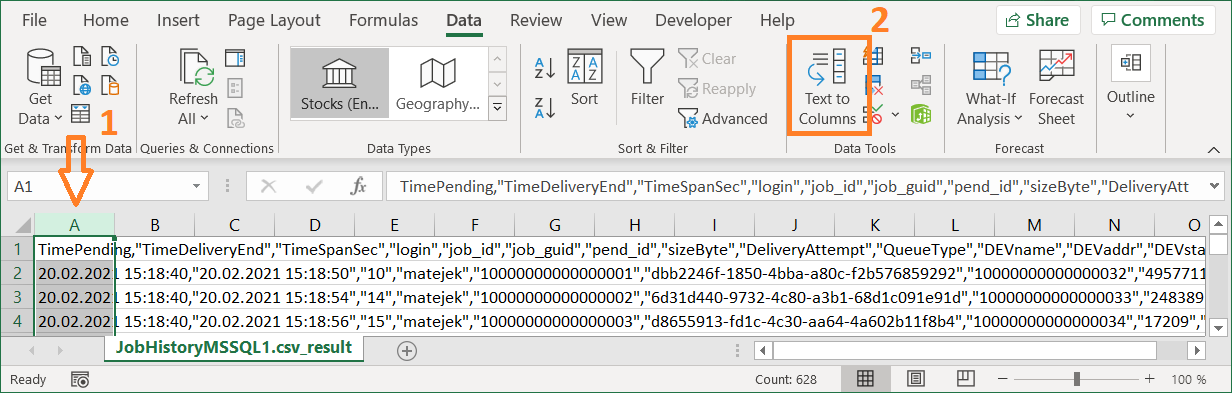
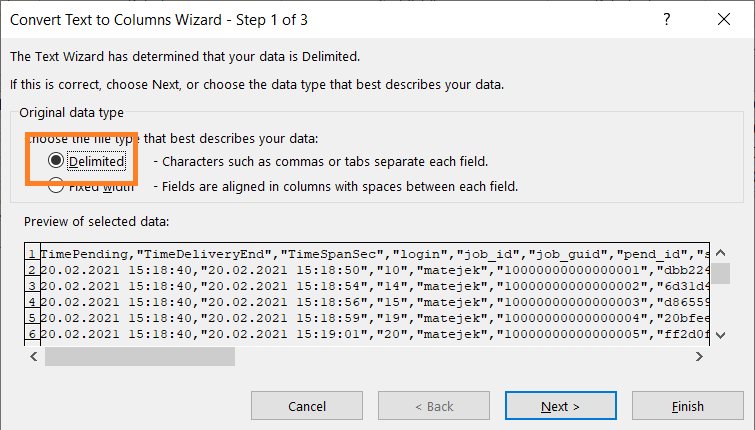
Separate data to columns
-
script uses the delimiter configured in parameter $delim
-
the column job_id and pend_id must be set to Text
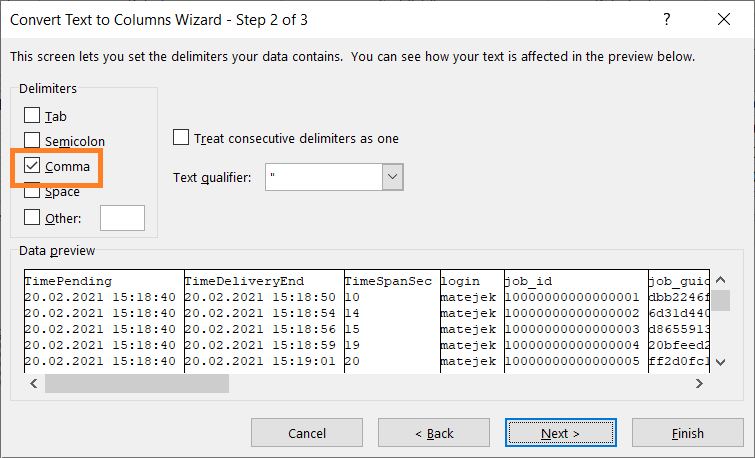
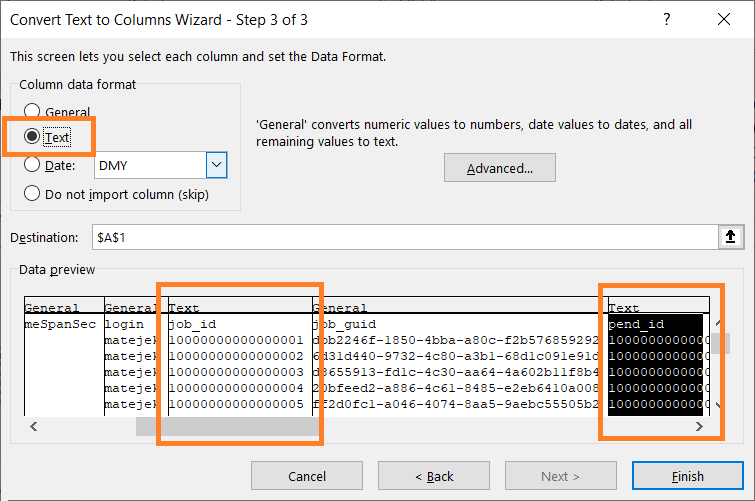
-
-
Save the file as XLSX (else any change you make will be lost since advanced formatting is not supported in CSV)
-
Generate the report based on your needs
-
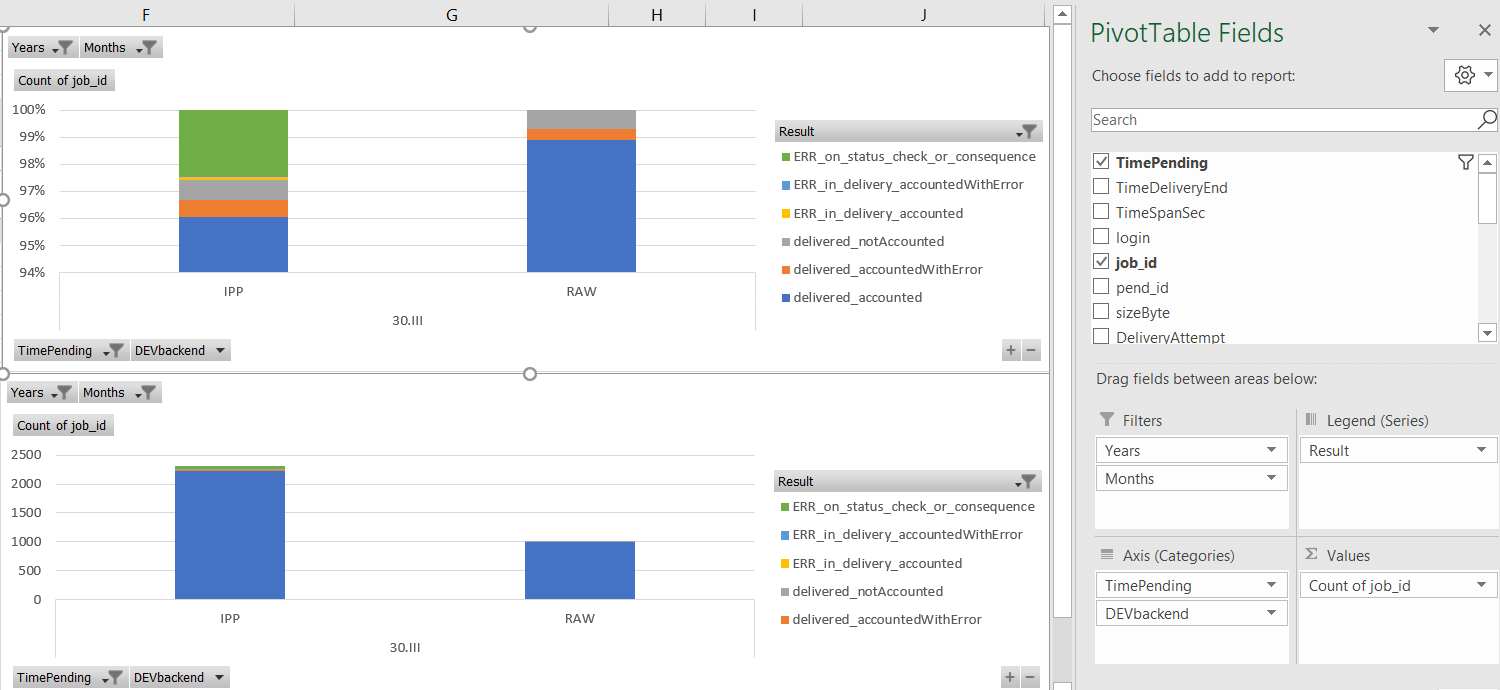
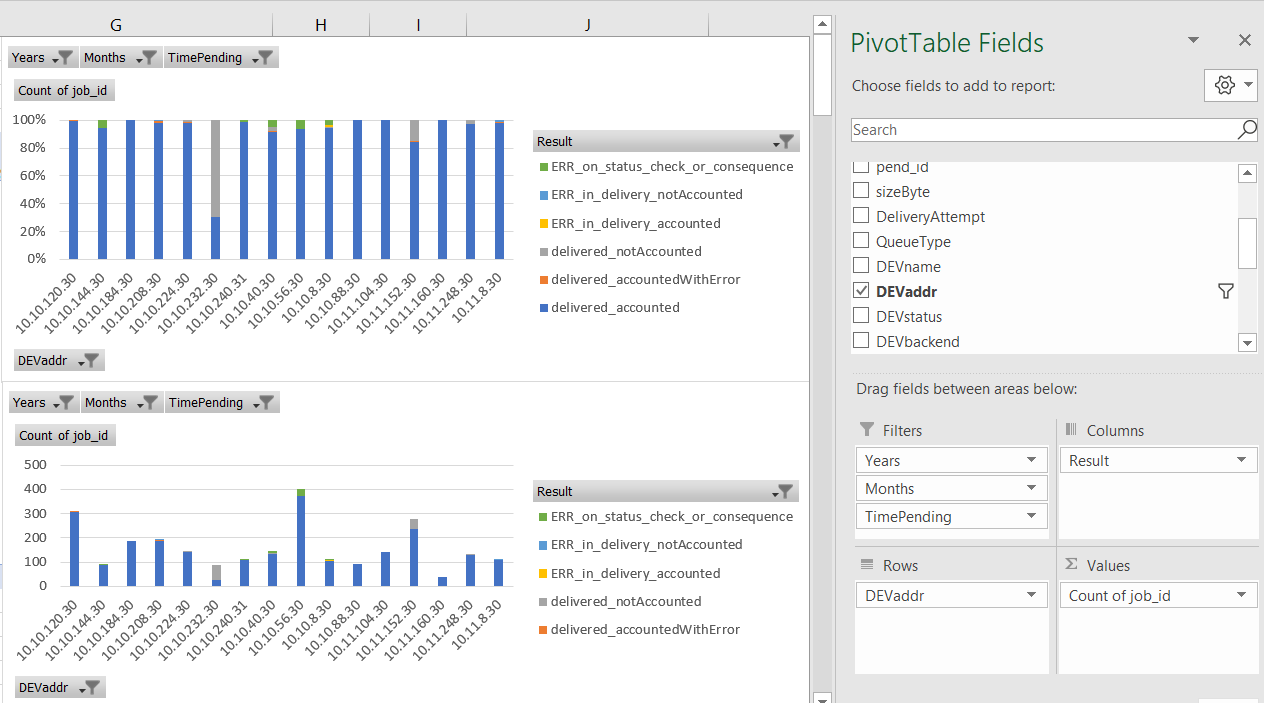
example showing that the most of printing is done on printers with RAW backend, it is also visible that in this particular case RAW backend performs better since the most of jobs are in accounted_delivered
-
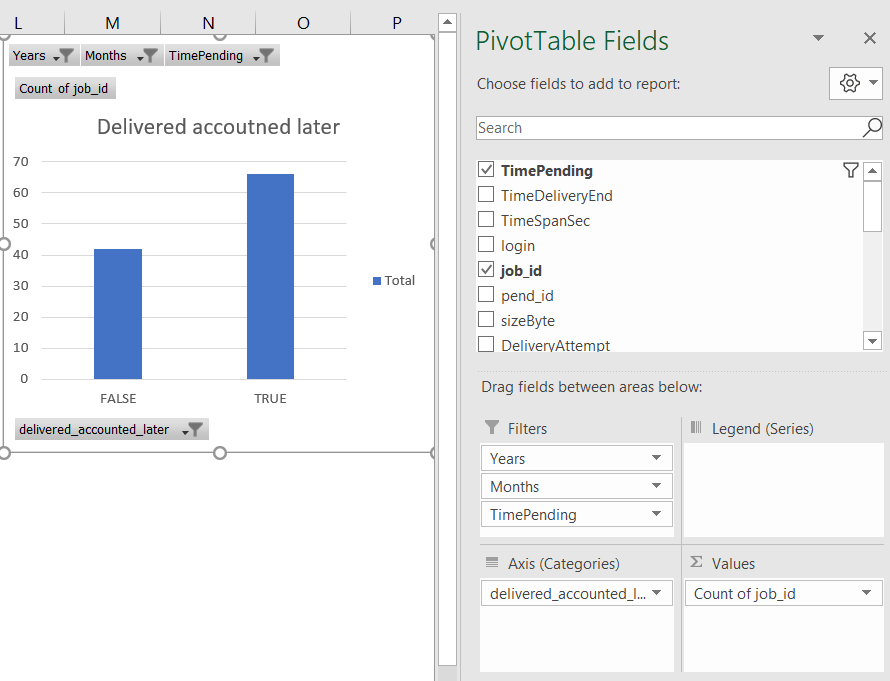
example showing that while the users are experiencing some difficulties releasing the print jobs, the majority of jobs that failed to print is released just fine by the user a bit later
-
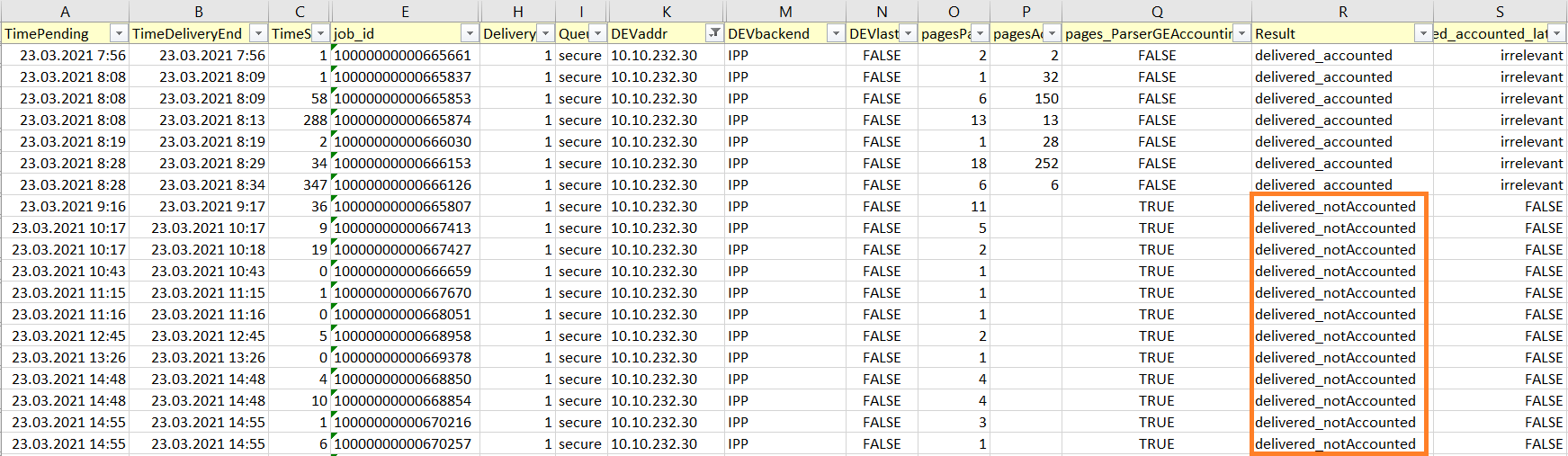
example showing the MFD which is experiencing the most of accounting issues, by looking into device history you can identify the point when the accounting stopped functioning
-
Explanation of columns:
-
TimePending - when the job was queued for print
-
TimeDeliveryEnd - when the job delivery to MFD finished (e.g. the time when MFD accepted job, when delivery was terminated due to connectivity error or when administrator canceled the delivery)
-
TimeSpanSeconds - time difference between TimePending and TimeDeliveryEnd (e.g. if user tried to release 3 jobs at the same time on terminal, the last job will have the highest TimeSpanSeconds since it will include also the time of preceding deliveries)
-
login - username for person initiating print
-
job_id - id of a job
-
job_guid - guid of a job
-
pend_id - id of a job pending state event (along with TimePending it is used for sorting, since the two jobs might be set for pending at the same time but one of them was queued for print as first, pend_id says which one was the first. Since pend_id has site-server based prefix, it cannot be used as the solitary sorting identifier.)
-
sizeByte - size of job in Bytes
-
DeliveryAttempt - number of delivery attempt. Job released twice will have two records in the output, fist one with value 1, second one with value 2
-
QueueType - type of YSoft SafeQ queue used for print, either direct or secure
-
DEVname - printer name at the time the SQL query was launched - see limitations
-
DEVaddr - printer network address at the time the SQL query was launched - see limitations
-
DEVacc - printer accounting type at the time the SQL query was launched - see limitations
-
DEVterm - printer terminal type at the time the SQL query was launched - see limitations
-
DEVstatus - ACTIVE for printer that is present in the system, DELETED for the one that was removed - status at the time the SQL query was launched - see limitations
-
DEVbackend - the job delivery backend set for printer at the time the SQL query was launched - see limitations
-
DEVspoc - name of SPOC responsible for the printer at the time the SQL query was launched - see limitations
-
DEVspocgroup - name of SPOC Group responsible for the printer at the time the SQL query was launched, if standalone SPOC the value is empty - see limitations
-
DEVlast15 - whether the job was among 15 last jobs released on the printer, either true or false
-
pagesParser - amount of pages YSoft SafeQ estimated during the job reception – this information might be inaccurate in some cases (e.g. when parser disabled or parser not returning correct value)
-
pagesAccounting - amount of accounted pages after the job was released
-
pagesParserGTAccounting - true when pagesParser > pagesAccounting , otherwise false , can be used for identification of potentially problematic jobs
-
Result - provides details about result of printing operation
-
delivered_accounted - job delivered to printer, job accounted afterwards (OK job)
-
delivered_notAccounted - job delivered to printer, no accounting information processed (likely problematic job - this could be caused disabled accounting, failure to obtain accounting data; or the job was canceled at MFD and accounting data provided were empty and YSoft SafeQ ignored them, after the fix SBT-2457 it will be possible to see them as CANCELED so the report will be more accurate for the root cause detection)
-
delivered_accountedWithError - job delivered to printer, accounting information contained error state (likely problematic job - job was released partially, typically jobs canceled on MFD level after missing paper or paper jam, job is accounted only partially and usually ends up in CANCELED state in YSoft SafeQ, only administrator is able to access such a job and queue it for print again - IB-3846)
-
ERR_in_delivery_accounted - job delivery to printer failed while the byte transfer was in progress, however accounting information contained no error (likely OK job, bytes transferred to MFD were likely sufficient to release the job, refer to pagesParserGTAccounting for further review, user will see it in PRINTED list)
-
ERR_in_delivery_accountedWithError - job delivery to printer failed while the byte transfer was in progress, accounting information contained error state (likely problematic job - job was released partially, typically jobs canceled on MFD level because the job was incomplete e.g. due to network interruption on delivery, these jobs usually ends up in CANCELED state in YSoft SafeQ, only administrator is able to access such a job and queue it for print again - IB-3846)
-
ERR_in_delivery_notAccounted - job delivery to printer failed while the byte transfer was in progress, accounting information never came (likely problematic job - user should be able to release it again from WAITING list)
-
ERR_on_status_check_or_consequence - job byte transfer to printer did not start, either the printer was not ready to accept the data (not responding on TCP/IP or returning error state via IPP) or the previous job from the same batch failed on delivery and thus consequent jobs from the same batch were going to error state instantly as well, user is typically able to release job again from WAITING list; for more details it is better to filter out the output to a specific MFD and review history of jobs preceding it
-
queued > canceled - job queued for print but canceled by administrator before the actual print attempt (problematic job, typically the case where job stays in PRINTING state and other jobs queue up behind it in PENDING state. Administrator cancels the PENDING jobs via YSoft SafeQ Management Interface before resolving issue with PENDING job. Jobs end up in CANCELED state in YSoft SafeQ, only administrator is able to access such a job and queue it for print again - IB-3846)
-
queued > canceled_on_server_reboot - job queued for print but canceled by server reboot before the actual print attempt (problematic job, the same consequences as queued > canceled )
-
queued > deleted - job queued for print but deleted by administrator before the actual print attempt
-
queued > rejected - job queued for print but rejected by RBE
-
in_progress - job was queued and did not fail nor succeed yet, typically the jobs that are currently being performed at the time when SQL query is launched
-
-
delivered_accounted_later – true for job where printing/accounting failed but user was eventually able to release the job later with successful accounting (on any attempt, no matter if it was 10th or 2nd try), otherwise irrelevant - see limitations